
Blog
How To Better Customize Submittals In DocBoss (Tips)
EPC projects frequently face severe delays and overruns along with increased documentation requirements and volume. “Fewer than 25% of oil…

Documentation supplied by third-party vendors (known as the Supplier Document Requirements List, or SDRL) is consistently cited as the single biggest bottleneck in the project information management lifecycle.
If you find yourself experiencing more stringent requirements from your EPC customers, you are not alone. If providing custom documentation at the end of projects has become so time-consuming and frustrating that standard applications like Excel no longer work, there is a better way.
Did you know you can tailor your documentation for your EPC customers right down to the font on cover pages and to the headers and footers on documents?
Headers/footers can be manually applied to individual cards on the card list. This feature provides the option to apply headers/footers on cards without having to submit them, which is useful for cards that will not be submitted individually but do need to be included in the final data book.
But you can also apply headers and footers on individual documents, as we’ll see below.
Header & footer application to individual documents
Set specific header and footers for individual certificates and reports which will be included in a compilation (data book).
The headers/footers set on these documents will not be overwritten in the compilation, and pagination (if included) will be applied alongside the headers/footers.
The problem
There are documents that do not need to be submitted to the customer individually, but do need to be included in the final databook.
These documents should have headers/footers but at present, headers/footers can only be applied during the submittal process.
The solution
Applying headers/footers to individual cards, which can be done quickly and efficiently by selecting any/all cards from the card list.
The details
Some additional details are as follows:
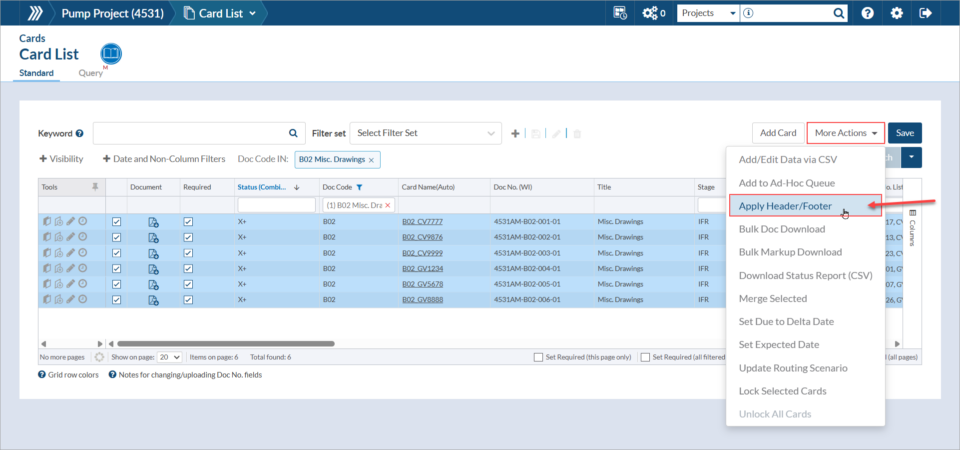
This feature is useful for cards which need to be included in the final databook, but will not be submitted. The headers/footers set on these cards will not be overwritten in the compilation, and pagination (if included) will be applied alongside the headers/footers.
DocBoss is the only true document control system for
suppliers. Book a quick demo to see how we help process
equipment suppliers make more profit with less pain.
EPC projects frequently face severe delays and overruns along with increased documentation requirements and volume. “Fewer than 25% of oil…

Do you spend significant time setting up new EPC projects and manually defining naming conventions, folder structure, and user permissions…

The global Oil & Gas EPC Market is projected to grow significantly, from USD 53.10 billion in 2023 to USD…