
Blog
Does DocBoss Support Simultaneous Review?
In a field where version integrity and audit trails are everything, simultaneous editing feels like a direct threat to the…

Customers sometimes require that documents on the Supplier Document Index (SDI) be grouped by major tag or by some other value they specify. In that regard, DocBoss enables you to group them by custom field and is just another way to automate specific customer requirements to make your work easier.
The order of the variables is as follows:
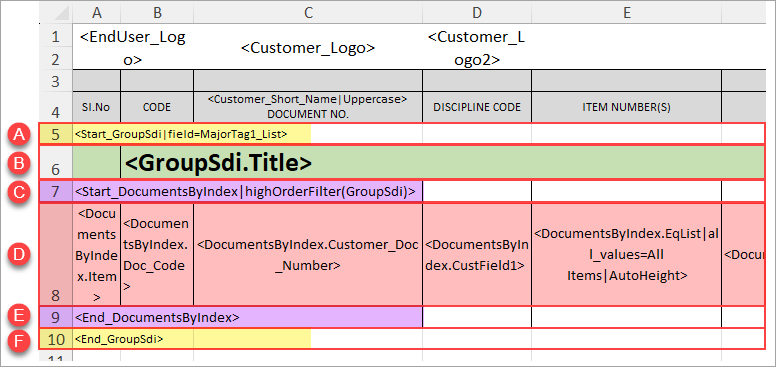
Once the SDI is generated, the groups will be order alphabetically.
If grouping by major tag – Cards that are associated with all possible groupings will be added to a “Standard Documents” grouping. However, if there are cards associated with more than one grouping (but not all), they will be added under a separate grouping for that unique set of values.
Example: There are 3 major tags – A, B and C.
– Cards associated with all 3 major tags will be added to the “Standard Documents” grouping
– Cards associated with 2 of the 3 major tags will be added to their own specific grouping (e.g., “MT 1 & 2,” “MT 2 & 3”, or “MT 1 & 3”)
DocBoss is the only true document control system for
suppliers. Book a quick demo to see how we help process
equipment suppliers make more profit with less pain.
In a field where version integrity and audit trails are everything, simultaneous editing feels like a direct threat to the…

The “Add Doc Code to Project” API call in DocBoss allows you to programmatically add document codes (categories) to an…

Did you know that you can not only have as many DocBoss users as you like, you can choose the…