
Product Updates
Inherit Data from Major Tag Columns to Tagged Equipment Units
When a user enables an equipment field for a major tag, data from that field will be available from the…

Secondary code(s) provide the option to link a manual card to other requested doc codes when an association exists between them, or if multiple doc codes apply to one card. Secondary codes can only be added to manual cards, and cannot be added to auto-generated cards.
To add a secondary doc code(s) to a manual card, simply select from the “Secondary Code(s)” drop-down at the time of manual card creation.
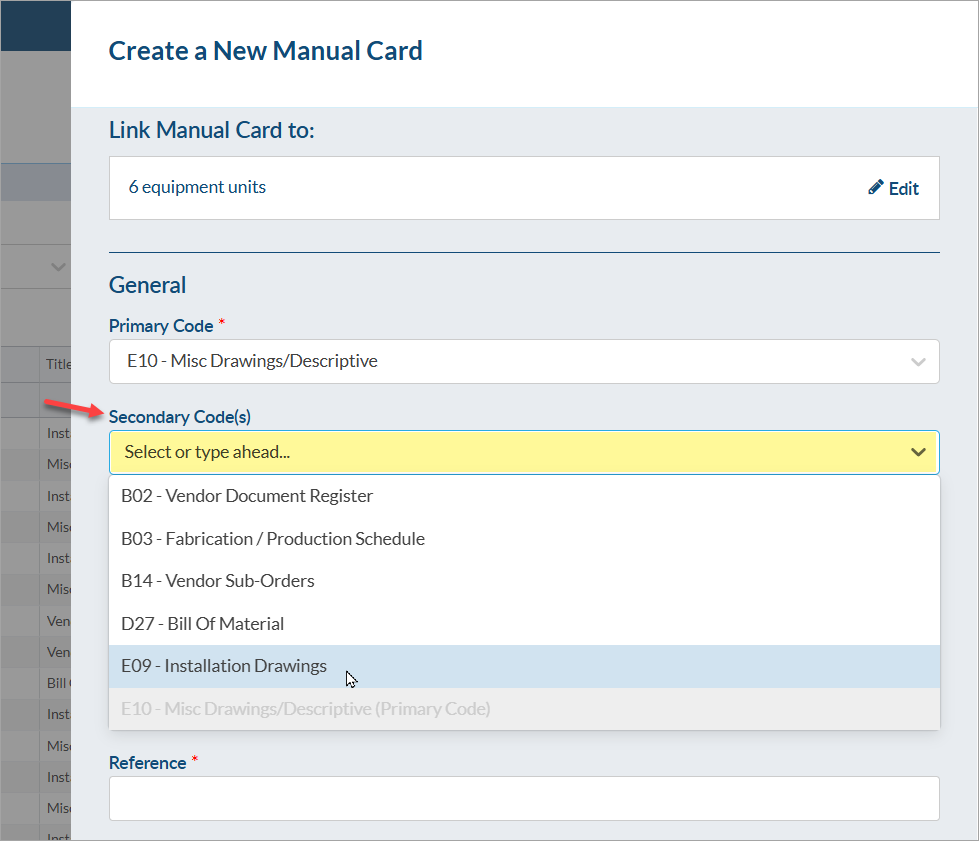
After the manual card is created, a secondary code(s) can be be added/removed by clicking the pencil icon under “Tools.”
To have secondary codes appear in the compilation table of contents, see instructions: Overview of Table of Contents Options.
For more information about manual cards, see the following articles:
DocBoss is the only true document control system for
suppliers. Book a quick demo to see how we help process
equipment suppliers make more profit with less pain.
When a user enables an equipment field for a major tag, data from that field will be available from the…

You can configure DocBoss in terms of user numbers whichever way you require. As you grow you can easily adjust…

Do you have affiliates that you work with who could benefit from having access to DocBoss? For customers with affiliates…