 Templates are a great tool in DocBoss to create and save documents that you can then use again in the future for other projects to save time during the setup phase.
Product Updates
May 2026 Release Notification
Here is our May 2026 Release Notification with brand new functionality that is now available to all DocBoss subscribers. This…
Read NowTemplates are a great tool in DocBoss to create and save documents that you can then use again in the future for other projects to save time during the setup phase.
A Project Field Template allows you to define some default settings for your project.
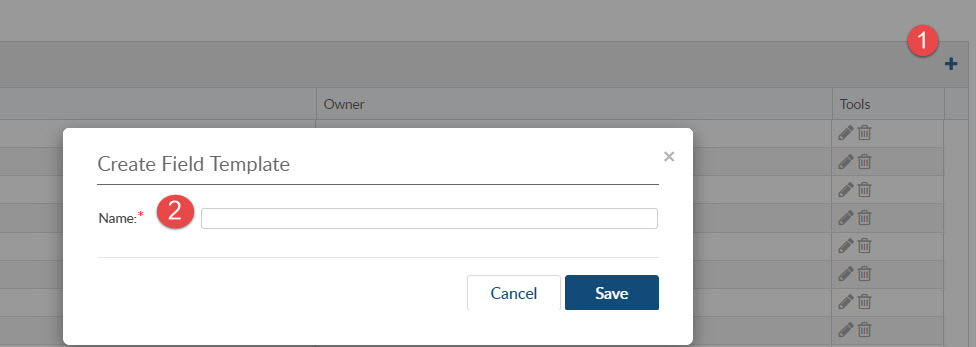
Navigate – Admin > (Customization) Project Templates
Step 1 Click “+” to add Step 2 Name your Template (make it something relevant so it is easy to select/distinguish for future projects)
You will be redirected to the Project Settings screen. From the navigation bar on the left, choose each heading to view the options belonging to that category.
Project Settings
Doc Code/Card Fields
Major Tag Field
Additional Unit Types
Combination Fields
Equipment Fields
Project (Main) Fields
Doc Code Queries
Expediting Settings
Compilation / Package Presets
Output Templates
DocBoss is the only true document control system for suppliers. Book a quick demo to see how we help process equipment suppliers make more profit with less pain.
Here is our May 2026 Release Notification with brand new functionality that is now available to all DocBoss subscribers. This…
Read NowHere’s a list of updates found in our February 2026 release. Interface Changes Incoming Documents – Assign pop-up: The layout of the incoming assign…
Read NowIf your EPC projects require you to update equipment as the project progresses, how difficult is it for your current…
Read Now