
Guides
The monthly document meeting with your EPC: what to walk in with
If documents are behind, or your customer thinks they are, the topic lands on the monthly progress meeting agenda, and…
Read Now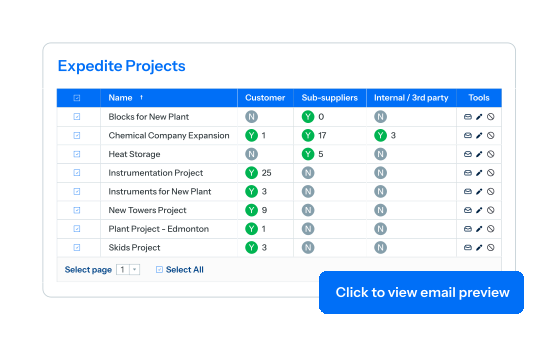
Your sub-suppliers owe you documents that have not arrived. Your customer owes you returns that have been sitting for three weeks. Your own reviewers have a queue. All of it costs you the same delay. DocBoss generates coming-due and overdue reports for every party at once, across as many projects as you want, and sends them.
Shift from being chased to leading the conversation, preview every customer-facing report, and bring every order under complete tracking control.
Symmetry
Expediting that only faces your suppliers solves half the problem. The documents sitting unreviewed at your customer are just as late, and nobody else is going to chase them.
Posture
Being the supplier who reminds the customer, rather than the supplier being chased, changes the conversation. Customers notice which of their vendors runs this way.
Reach
Small orders get less attention because watching them by hand is not worth the time. When the report builds itself, every project gets the same visibility.
Control
Reports and emails are previewed before they send. Consistent and professional beats frequent and irritating, particularly with a customer.
Measurement
On-time delivery and on-time receipt are measured, so “documents are always late” becomes a number you can act on.
Building manual chase lists project by project cannot be a long-term strategy. See how DocBoss sends consolidated overdue reports to every sub-supplier and customer across all active jobs.
Automate portfolio-wide expediting, track expected turnarounds across all parties, and deliver clear progress reports before deadlines slip.
Generate target-specific reports listing coming-due and overdue documents for customers, sub-suppliers, internal teams, or third parties. Filter by items approaching deadlines or strictly past due.
Maintain dedicated document-chasing contact lists per customer and sub-supplier, ensuring expediting reports reach active document controllers rather than original purchase order contacts.
Schedule automated inbox reports for overdue files, upcoming deadlines, status changes, and untouched submittals. Receive instant alerts the moment new review actions are assigned to you.
Monitor completion, overdue files, active customer reviews, and un-downloaded submittals through a portfolio dashboard. Group, filter, and pin priority projects to track real-time status.
Run expediting across your entire portfolio at once. Vendors working across multiple jobs receive a single consolidated report covering all active projects instead of fragmented individual emails.
Export expedite reports as web views or customizable spreadsheets grouped by submittal, due date, or document code, delivering clean, branded reports to your customers.
Track customer due dates alongside expected return dates simultaneously. DocBoss calculates turnaround times for customer, internal, and routed actions automatically while flagging manual date overrides.
Evaluate on-time delivery rates, receipt turnaround times, overdue document counts, and average wait times per party to pinpoint whether customers or internal teams are project bottlenecks.
Get answers to questions about DocBoss’s Expediting & Reporting features
Both, and they are the same operation. Your customer’s report lists what they have had for review and not returned; your sub-supplier’s lists what they owe you. The supplier-facing half is the one people expect; the customer-facing half is the one that is harder to raise by phone and easier to raise with a report.
As frequent as you choose to make it, and you see every report and every email before it sends. The value is consistency: a professional coming-due and overdue list on a predictable rhythm, rather than an apologetic phone call once something is three weeks late.
Yes. Select all the relevant projects and each party gets one report covering everything they owe you.
Get answers to questions about DocBoss’s Expediting & Reporting features
Both, and they are the same operation. Your customer’s report lists what they have had for review and not returned; your sub-supplier’s lists what they owe you. The supplier-facing half is the one people expect; the customer-facing half is the one that is harder to raise by phone and easier to raise with a report.
As frequent as you choose to make it, and you see every report and every email before it sends. The value is consistency: a professional coming-due and overdue list on a predictable rhythm, rather than an apologetic phone call once something is three weeks late.
Yes. Select all the relevant projects and each party gets one report covering everything they owe you.
Guides to expedite reports, scheduled reporting and cross-project visibility.
If documents are behind, or your customer thinks they are, the topic lands on the monthly progress meeting agenda, and…
Read NowEvery supplier chases its sub-suppliers for late documents. It’s normal, expected, and there’s usually a routine for it. Almost nobody…
Read Now